How to Uninstall Claude Code on Mac: Native, npm and Homebrew Installs, Plus the ~/.claude Folder
To uninstall Claude Code on a Mac, sign out with /logout, then remove it the way you installed it. For the native installer, delete ~/.local/bin/claude and ~/.local/share/claude; for npm, run npm uninstall -g @anthropic-ai/claude-code; for Homebrew, run brew uninstall --cask claude-code. Delete ~/.claude and ~/.claude.json only if the Claude desktop app is gone too.
That is the short answer to how to uninstall Claude Code on Mac. Claude Code is the terminal tool, not the Claude app in /Applications, and removing one does not remove the other.
If you only used Claude Code inside the Claude desktop app, there is no command to remove. In that case, ~/.claude and ~/.claude.json belong to the app, so remove it first, then use Step 4.
What Claude Code installs on a Mac, and where
The tool is one program, plus data in your home folder and a small helper app. That data can grow to many gigabytes, and our guide to mapping disk space with Finder and Storage settings shows where yours went.
| Install route | Install command | Where claude lives |
|---|---|---|
| Native installer (Anthropic's recommended route) | curl -fsSL https://claude.ai/install.sh | bash |
~/.local/bin/claude, a link into ~/.local/share/claude/versions
|
| Homebrew |
brew install --cask claude-code or claude-code@latest
|
$(brew --prefix)/bin/claude, often /opt/homebrew/bin on Apple silicon and /usr/local/bin on Intel |
| npm | npm install -g @anthropic-ai/claude-code |
Your npm global folder, which changes with nvm, fnm, Volta, bun or pnpm |
| Old local install | Created by earlier versions |
~/.claude/local, plus a claude alias in a shell file |
The native installer also writes ~/.local/state/claude (lock files), ~/.cache/claude (staged downloads) and ~/.claude/downloads. It keeps the two newest versions.
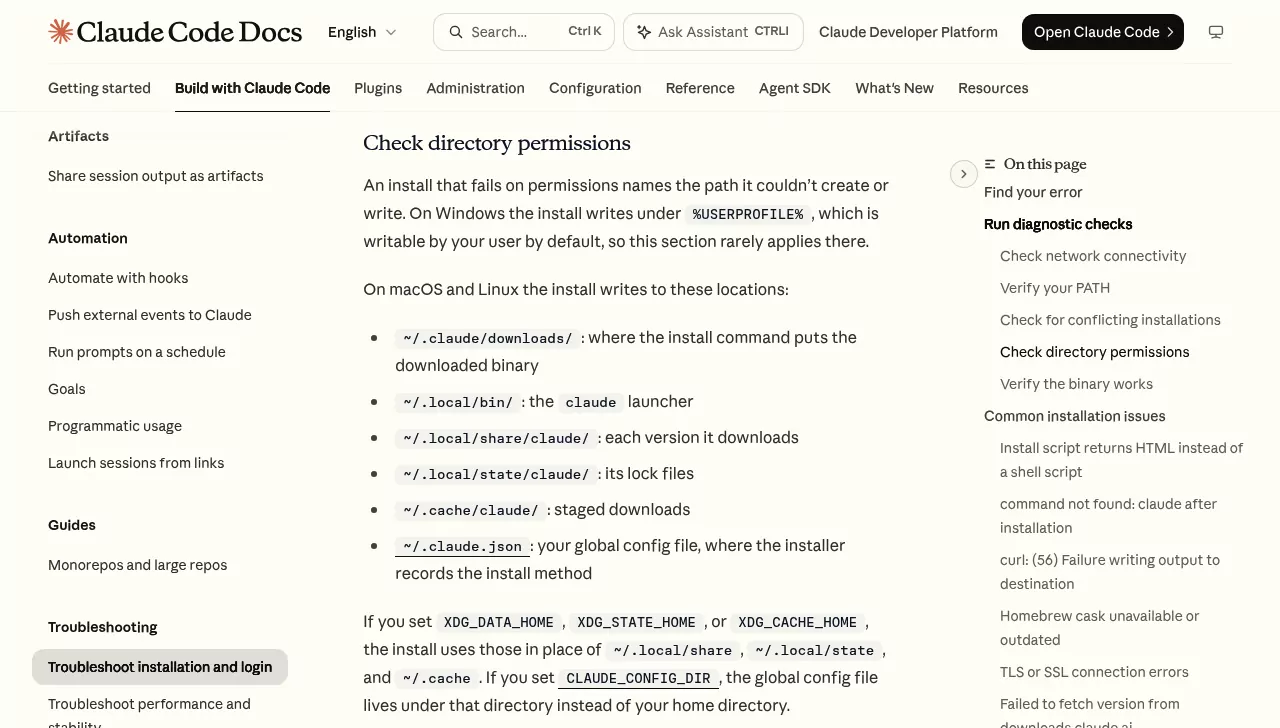
Every route leaves the same data behind:
| Item | What it holds | Size on our test Mac |
|---|---|---|
~/.claude |
Settings, skills, plugins, every prompt you typed in history.jsonl, and full transcripts in projects
|
7.9 GB, of which 7.5 GB in 81 project folders |
~/.claude.json and ~/.claude.json.backup
|
App state, project trust and MCP servers, shared with the desktop app and editor extensions | 93 KB and 81 KB |
~/Library/Caches/claude-cli-nodejs |
A cache, one subfolder per project | 5.3 MB |
/private/tmp/claude-<uid> |
The temp folder: session scratchpads and pasted images | 71 GB in 21 project folders |
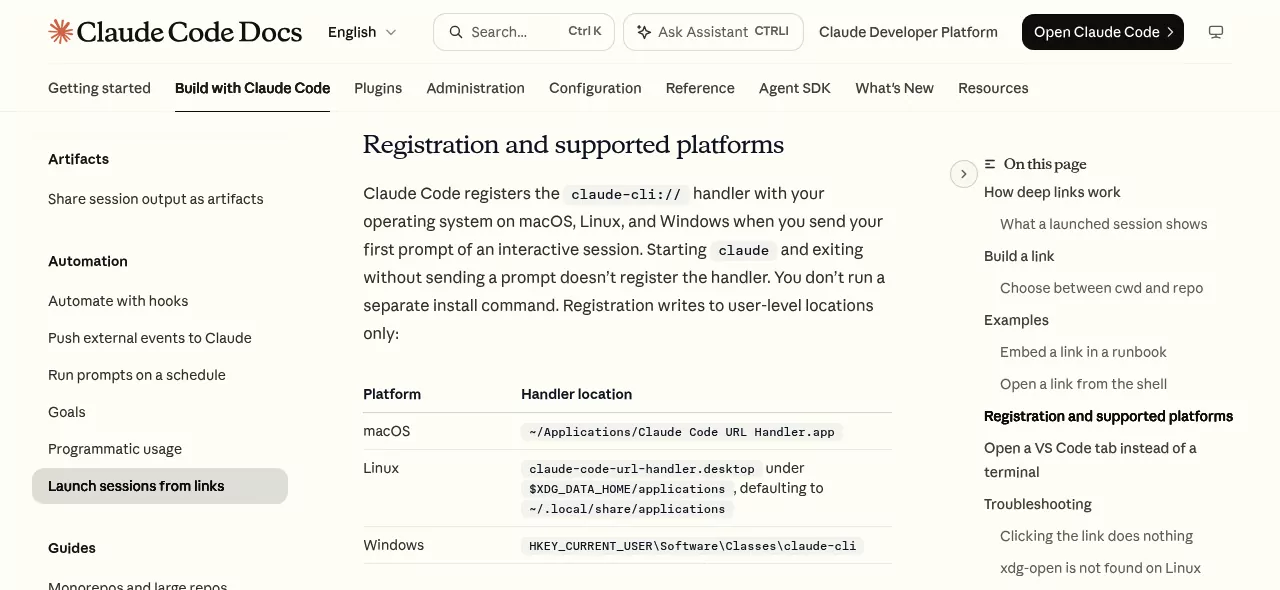
~/Applications/Claude Code URL Handler.app |
Opens claude-cli:// links, created on your first prompt |
Not created here |
~/.vscode/extensions and ~/.cursor/extensions
|
anthropic.claude-code folders, each with its own copy of Claude Code |
1.1 GB across five versions |
Sizes come from a macOS Tahoe 26 test Mac that ran Claude Code through the desktop app and the VS Code and Cursor extensions. Claude Code adds no login items by default, and your sign-in sits in the login Keychain.
Why dragging Claude Code to the Trash is not enough
The native install sits in a dot folder, and Finder hides dot folders until you press Command, Shift and period. Apple's guide to going directly to a folder covers the Go to Folder command used below.
Whichever way you uninstall the Claude CLI, it leaves ~/.claude, the temp folder, the extensions and your project files in place. The URL handler survives every route too.
Before you uninstall Claude Code on Mac
Sign out while the command still works
Type /logout at the Claude Code prompt, or run claude auth logout in Terminal. Anthropic's troubleshooting guide says this removes all stored credentials, including MCP server logins and plugin secrets.
If you signed in with a Console account and no API key, Anthropic's authentication page says /logout also revokes that login.
Stop background sessions
If you used background sessions, run claude agents to check for work you still want. Then run claude daemon stop --any, which stops the supervisor and the sessions it runs, as Anthropic's agent view page explains. If you set Claude Code up as an OS service, leave out --any.
Back up what you want to keep
Copy what you may want back to a safe place: ~/.claude/skills, ~/.claude/agents, ~/.claude/CLAUDE.md, ~/.claude/settings.json, and each project's memory folder in ~/.claude/projects.
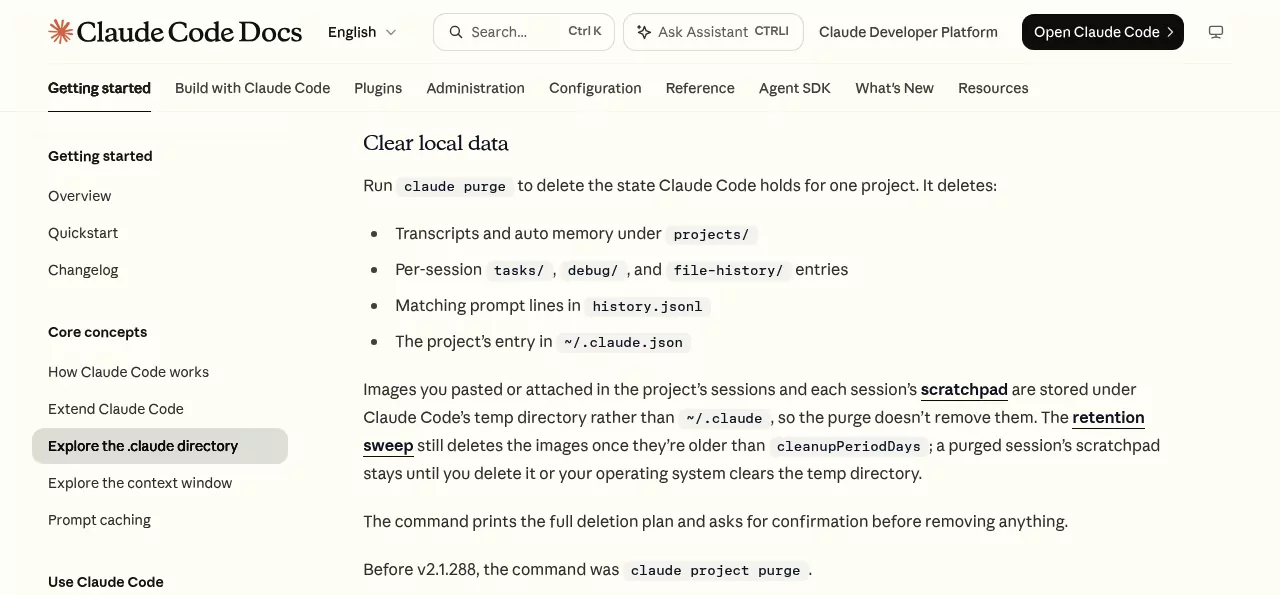
Or clear one project instead of everything
To wipe one project and keep the rest, do it before Step 2, while the claude command still works. Preview the plan first, using your project's folder:
claude purge ~/code/my-repo --dry-runRun it again without --dry-run to delete that project's transcripts, memory, checkpoints, its lines in history.jsonl and its entry in ~/.claude.json. It asks before deleting, as Anthropic's Clear local data section describes.
On versions before 2.1.288, including Homebrew's stable cask in early October 2026, type claude project purge instead. Check yours with claude --version.
Step 1: Work out how Claude Code was installed
Open Terminal from Applications > Utilities (see Apple's Terminal guide) and run these read-only checks:
which -a claudeEach line is one claude on your PATH, so two lines mean two installs. In zsh, a line such as claude: aliased to ... is an alias left by an old installer.
ls -la ~/.local/bin/claude
brew list --cask | grep claude-code
npm -g ls @anthropic-ai/claude-code
ls -la ~/.claude/local
In order, these look for the native installer, Homebrew, a global npm package and the old local install, following Anthropic's conflicting installations check. A "No such file or directory" or "command not found" reply just means nothing is there.
With nvm, ls ~/.nvm/versions/node/*/bin/claude finds a copy in each Node version, and "no matches found" means none. For a path under ~/.volta, ~/.bun or pnpm, use that tool's own remove command.
Step 2: How to uninstall Claude Code on Mac for each install route
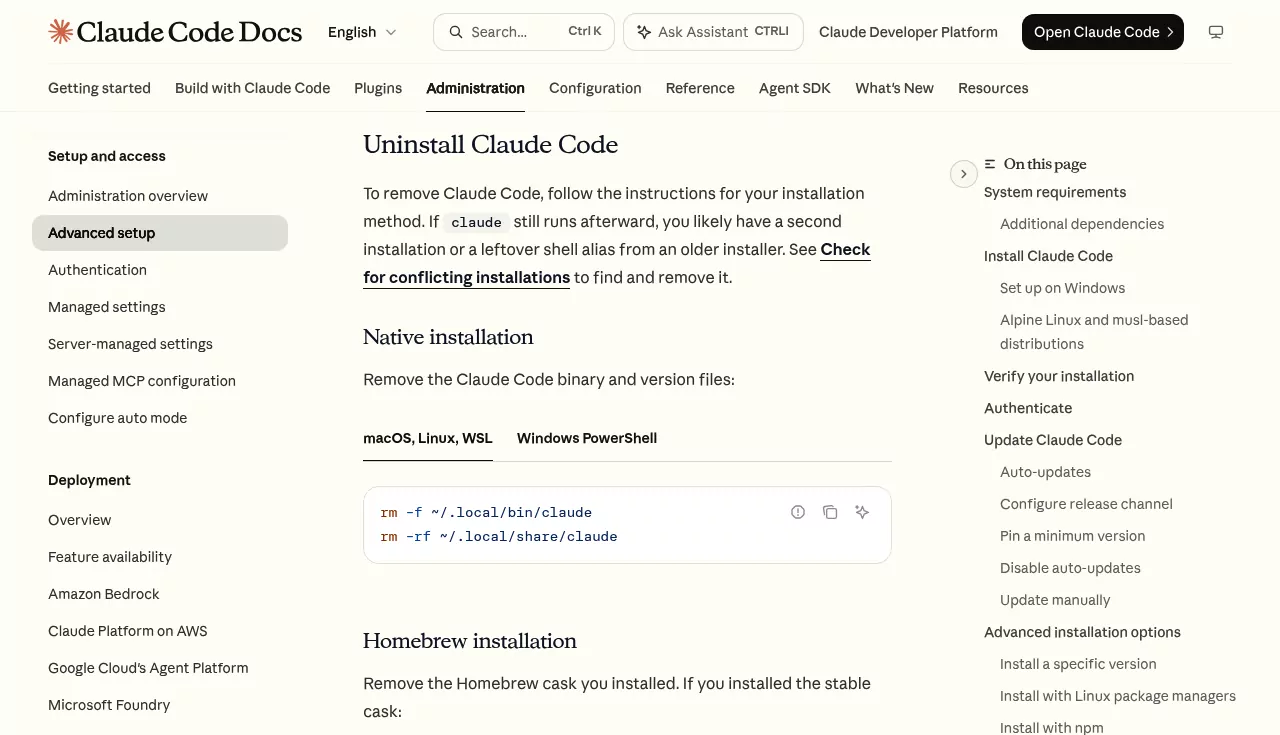
Use Anthropic's uninstall commands to uninstall Claude Code from Terminal, once for each install Step 1 found. There is no claude uninstall command. If Claude Code suggests claude install instead, don't run it: that reinstalls the program.
Native installer
These lines delete the program, its saved versions, lock files and staged downloads. They do not touch your projects or settings.
rm -f ~/.local/bin/claude
rm -rf ~/.local/share/claude
rm -rf ~/.local/state/claude ~/.cache/claude
The first two lines are Anthropic's. The third clears two folders from its list of install locations. If you set XDG_DATA_HOME, XDG_STATE_HOME or XDG_CACHE_HOME, those folders sit there instead.
Delete only the claude file in ~/.local/bin, never the folder. Other tools keep their commands there too.
Homebrew: brew uninstall
brew uninstall --cask claude-codeFor the latest channel, use claude-code@latest instead. Then brew cleanup -s claude-code deletes its cached downloads. Without -s, Homebrew keeps the current version's download.
Take care with brew uninstall --zap --cask claude-code. Zap moves to the Trash ~/.claude.json and every file whose name starts with it, ~/Library/Caches/claude-cli-nodejs, any native install, ~/.local/state/claude, ~/.cache/claude and ~/.config/claude. Check the Trash before you empty it.
Zap removes ~/.claude only if that folder is empty, so your sessions stay. But it trashes the settings file the desktop app and extensions share, and it skips the URL handler, the temp folder and the Chrome connector.
npm: npm uninstall
npm uninstall -g @anthropic-ai/claude-codeRun it without sudo, once per nvm or fnm Node version. If npm answers EACCES or "permission denied", the package went into a system-owned folder, common with the nodejs.org installer.
In that case run sudo npm uninstall -g @anthropic-ai/claude-code once, the only sudo in this guide. macOS asks for your login password, and only that package goes.
Interrupted installs can leave hidden folders. The first line lists them, and Anthropic's second line deletes only those starting with .claude-code-:
ls -a "$(npm root -g)/@anthropic-ai"
rm -rf "$(npm root -g)/@anthropic-ai/.claude-code-"*
If zsh replies "no matches found", there were none. Leave ~/.npm/_cacache alone: it is npm's shared cache for every package.
Old local install
If Step 1 found ~/.claude/local, delete that folder in Finder. Then open ~/.zshrc in a text editor and delete the line that defines a claude alias. Some setups keep it in ~/.bashrc, ~/.bash_profile, ~/.profile or ~/.config/fish/config.fish instead.
Step 3: Remove the Claude Code editor extensions
Do this before you delete any data. Anthropic's setup page warns that the VS Code extension, the JetBrains plugin and the desktop app recreate ~/.claude on their next run.
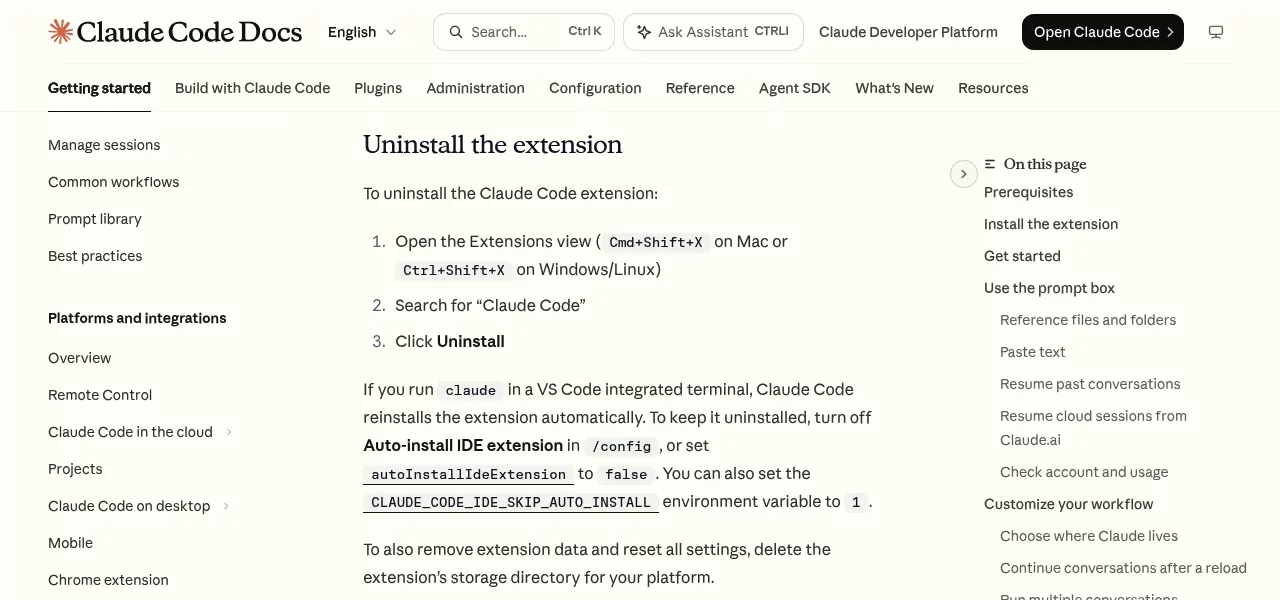
- In VS Code, press Command, Shift and X to open Extensions.
- Search for Claude Code and click Uninstall.
- Repeat in Cursor, which keeps its own copy in
~/.cursor/extensions.
Running claude in VS Code's built-in terminal puts the extension back, one more reason to remove the command first. Anthropic's VS Code page also names a data folder, ~/Library/Application Support/Code/User/globalStorage/anthropic.claude-code. Trash it if it exists.
In a JetBrains IDE, open Settings, then Plugins, uninstall Claude Code and restart. The JetBrains plugin has no copy of the tool, but /ide installs the plugin again if Claude Code spots an IDE without it.
Step 4: How to completely uninstall Claude Code by deleting the leftovers
Warning:~/.claudeis shared with the Claude desktop app's Code feature. Since version 2.1.248, transcripts of sessions started in the desktop app or Cowork are kept at any age, while terminal transcripts are deleted after 30 days by default. If you keep the desktop app, deleting~/.claudealso deletes its Code sessions, scheduled tasks, skills and settings.
If you keep the desktop app, run claude purge for each project before Step 2, as in "Or clear one project instead of everything", then skip items 1 and 2 here. The app's own copy of Claude Code, in ~/Library/Application Support/Claude/claude-code, goes with the app.
To reach each item, choose Go > Go to Folder in Finder, type the path and press Return.
-
~/.claude. Go to~, press Command, Shift and period, and drag the .claude folder to the Trash. Its plain-text transcripts can hold secrets, so this is also a privacy step. -
~/.claude.jsonand~/.claude.json.backup. Trash them only if the desktop app and the editor extensions are gone too. -
~/Library/Caches/claude-cli-nodejs. Drag it to the Trash. -
The temp folder. Quit every Claude session and restart your Mac, which can clear it. If
/private/tmp/claude-plus your user number survives, deleting it loses its scratchpad files and pasted images; to go ahead, runrm -rf /private/tmp/claude-$(id -u), where$(id -u)fills in your number. WithCLAUDE_CODE_TMPDIRset, look there instead. - The URL handler. Choose Go > Home, open Applications (the one in your home folder, not the main one) and drag Claude Code URL Handler to the Trash.
-
Native extras. If you skipped them in Step 2, trash
~/.local/state/claudeand~/.cache/claude. If a~/.config/claudefolder exists, trash it too. -
The Chrome connector. If you used Claude in Chrome with Claude Code, trash
com.anthropic.claude_code_browser_extension.jsonfrom~/Library/Application Support/Google/Chrome/NativeMessagingHosts. Edge and Brave keep copies in their own NativeMessagingHosts folders. Leavecom.anthropic.claude_browser_extension.json, which belongs to the desktop app. -
A custom config folder. If you set
CLAUDE_CONFIG_DIR, trash that folder too. -
Shell lines. In
~/.zshrcand the other shell files, delete exports ofCLAUDE_CODE_OAUTH_TOKENandCLAUDE_CONFIG_DIR. Remove anANTHROPIC_API_KEYexport only if nothing else uses it, and keep a~/.local/binPATH line if other tools need it. -
Project files. Each project can hold
.claude,.mcp.jsonandCLAUDE.md. These are often shared with a team in git, so on shared repos delete only.claude/settings.local.json. Check.claude/worktreesfor unsaved work first.
For item 7, this read-only command finds every copy of the connector file:
find ~/Library/"Application Support" -maxdepth 4 -name com.anthropic.claude_code_browser_extension.json 2>/dev/nullAnthropic's Chrome integration page lists these paths. If you are done with Chrome itself, our guide to uninstalling Google Chrome covers the rest of that folder.
For item 10, this read-only command lists those files. Replace ~/code with your code folder:
find ~/code -maxdepth 4 -name node_modules -prune -o \( -name .claude -o -name .mcp.json -o -name CLAUDE.md \) -printEmpty the Trash once you are sure, to get the space back.
Step 5: Account, subscription and API keys
- Uninstalling does not cancel Claude Pro or Max. Cancel in claude.ai under Settings, Billing, as Anthropic's cancellation article explains. If you subscribed in the iPhone app, use Apple's subscription steps.
- Routines you made with
/schedulekeep running in the cloud and use your plan's limits. Pause or delete them at claude.ai/code/routines, as the routines page shows. - If you ran
/install-github-app, remove the Claude GitHub App in GitHub. Console users can revoke keys Claude Code made at platform.claude.com/settings/keys. - If you skipped
/logout, open Keychain Access, search for Claude Code and delete any item whose name starts with it. - A Console sign-in without an API key is stored as a profile in
~/.config/anthropic. If you skipped/logout, delete that profile's file in itsconfigsfolder. - Deleting your Anthropic account is a separate, final step, covered in Anthropic's account deletion article.
Confirm nothing from Claude Code is still running
Open a new Terminal window and run these read-only checks:
which -a claude
ls ~/Applications | grep -i claude
ls ~/Library/LaunchAgents | grep -i -E 'claude|anthropic'
In zsh the first prints claude not found and the others print nothing or "No such file or directory". Either reply means nothing is there.
A path from the first means a second install or alias remains, so go back to Step 1. If the last lists a file and the desktop app is gone too, trash it and restart.
Next, open Activity Monitor and search for claude. Processes running from ~/Library/Application Support/Claude/claude-code belong to the desktop app and stop when you quit it.
To see a process's folder, double-click it and open the Open Files and Ports tab. A claude process from any other folder is a session or the background supervisor, so select it and click the Stop button.
Last, open System Settings > General > Login Items & Extensions, using Apple's Login Items guide. Turn off a Claude entry only if the desktop app is gone too.
Reinstalling Claude Code cleanly later
For a fresh start that keeps your sessions, remove only the program in Step 2 and keep ~/.claude. Then reinstall with Anthropic's native installer and run claude doctor to check the setup:
curl -fsSL https://claude.ai/install.sh | bashTo stop the URL handler from coming back, set disableDeepLinkRegistration to "disable" in ~/.claude/settings.json, as Anthropic's deep links page notes.
Frequently Asked Questions
Is Claude Code the same as the Claude desktop app?
No. Claude Code is a command-line tool, while the desktop app lives in /Applications and ships its own copy. Removing one never removes the other.
Does uninstalling Claude Code delete my projects or chat history?
No. Your code stays where it is, and your sessions stay in ~/.claude until you delete that folder or purge a project.
Why does the claude command still work after I uninstall Claude Code?
Usually there is a second install, a copy in another Node version, or an old alias in ~/.zshrc. Run which -a claude in a new Terminal window to find it.
Is there a Claude Code uninstall command?
No. Anthropic's CLI reference lists claude install and claude update but no uninstall, so use the steps for your install route.
Will deleting ~/.claude break the Claude desktop app?
It won't break the app, but it deletes the app's Code sessions, scheduled tasks and skills. The app creates the folder again on its next launch.
Removing other apps from this Mac
The Sublime Text guide shows the same pattern: a command that outlives the app. The guides to removing Parallels Desktop and its virtual machines and getting Steam's game storage back deal with many gigabytes of data.