How to Uninstall Parallels Desktop on Mac (and Reclaim the Space Your VMs Use)
To uninstall Parallels Desktop on a Mac, first remove your virtual machines in Control Center (or copy the .pvm files you want to keep to another drive), because removing the app leaves every .pvm in place. Then quit Parallels Desktop, drag it from Applications to the Trash, as Parallels' own guide describes, and clear leftover preferences, caches and helpers.
Knowing how to uninstall Parallels Desktop on Mac is mostly a storage question. Your virtual machines are usually by far the largest part of a Parallels install, so check each one's size with Get Info before you delete anything.
Why dragging Parallels Desktop to the Trash is not enough
Parallels ships no separate uninstaller. Its article Uninstall Parallels Desktop for Mac says you just move the app to the Trash. The same page warns that this does not delete your virtual machine, the .pvm file that holds Windows and everything in it.
Other things stay too: a Business or Enterprise licence stays activated, and settings remain in your Library folder. Like other apps that add background helpers, Parallels installs a background service (prl_disp_service). Windows app shortcuts can linger, and Intel Macs may have Parallels kernel extensions.
Before you uninstall Parallels Desktop on Mac: decide what to keep
Find every virtual machine and check its size
Click the Parallels icon in the menu bar, choose Control Center, right-click a virtual machine and choose Show in Finder. Parallels' guide to locating a virtual machine on Mac also offers Spotlight: press Command and Space, then type pvm.
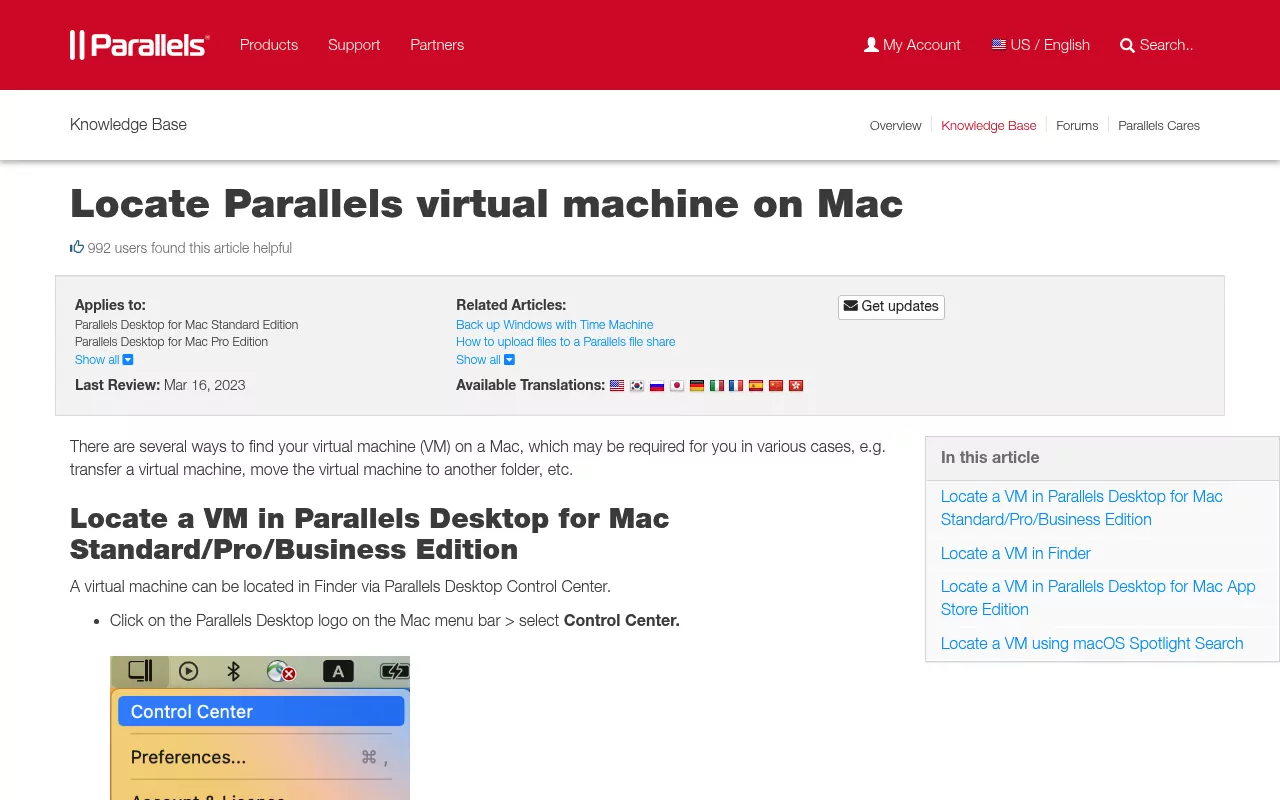
By default, virtual machines live in one of these places:
- The
Parallelsfolder in your home folder. - The shared folder at
/Users/Shared/Parallels. - A
Parallelsfolder inside Documents. - For the App Store Edition, a folder in
~/Library/Group Containerswhose name ends incom.parallels.desktop.appstore, underShared/Parallels. Machines downloaded from Free Systems go to your Downloads folder instead.
Select each .pvm and press Command and I to see its size. Or measure the three default folders in Terminal. This command skips any folder that does not exist and only reads sizes:
du -sh ~/Parallels /Users/Shared/Parallels ~/Documents/Parallels 2>/dev/nullThe App Store Edition folder in Group Containers is easiest to check with Get Info in Finder. Write the numbers down for Step 7.
Copy out the files you need
If you only need a few files, start Windows and save them to a Mac folder. To keep the whole machine, shut the guest down properly (Actions, then Shut Down in the Mac menu bar) and copy the .pvm to an external drive.
One limit matters if you plan a move. An Intel based virtual machine is built for a different processor.
Parallels Desktop 20.2 and later (Pro, Business and Enterprise editions) can still open one on a Mac with Apple silicon as an early technology preview, but it runs slowly and with limits, per the Parallels Desktop 27 User's Guide on running Intel virtual machines on Apple silicon. Keep a copy if you may need its files.
Free or note your Parallels licence
- Standard and Pro Edition: open the Parallels Desktop menu and choose Account & License to note your key or account. When you activate on another Mac and click Activate on This Mac, Parallels deactivates the old one for you.
-
Business and Enterprise Edition: before you delete the app, quit it and keep the Mac online. Then run
prlsrvctl deactivate-licensein Terminal. Parallels' licensing guide gives this command for both editions, and KB 122461 covers the Business Edition. An admin can also use Dashboard, Registered computers, Actions, Deactivate in the Parallels licensing portal, which can take up to seven days to reach the Mac. - Windows: note your Windows licence details before the virtual machine goes.
Step 1: Remove your virtual machines in Control Center
Warning: Move to Trash cannot be undone, so finish your copies first.
- Open Parallels Desktop, but do not start the virtual machine.
- Click the Parallels icon in the menu bar and choose Control Center.
- Right-click the virtual machine and choose Remove.
- Choose Move to Trash. Keep Files only takes it off the list and leaves every file on disk.
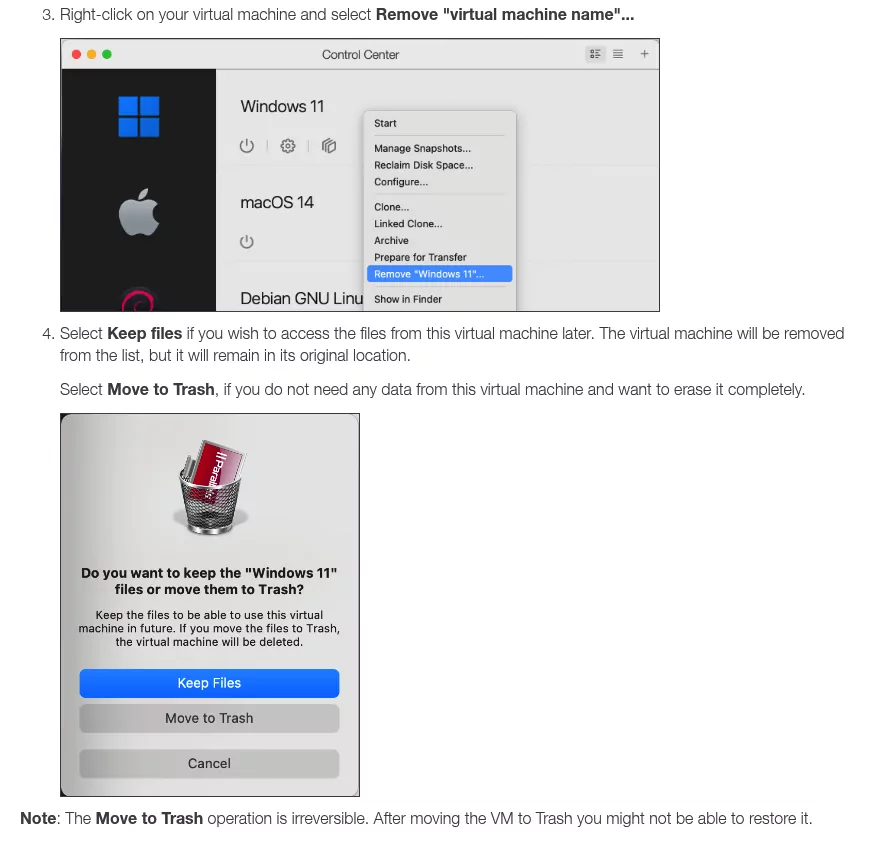
These steps come from KB 5029. The Parallels Desktop 27 guide to removing a virtual machine adds a check: make sure no other machine uses its virtual hard disk. Repeat for each machine you no longer need.
Keeping a machine? Shut it down, then choose File, then Free Up Disk Space.
The wizard shows what it can remove, such as snapshots and cache files. Deleting a snapshot removes that restore point.
Step 2: Quit Parallels Desktop and move it to the Trash
- Shut down any running virtual machine.
- Quit Parallels Desktop from the Parallels Desktop menu.
- Open Applications and drag Parallels Desktop to the Trash. Your Mac may ask for an admin password.
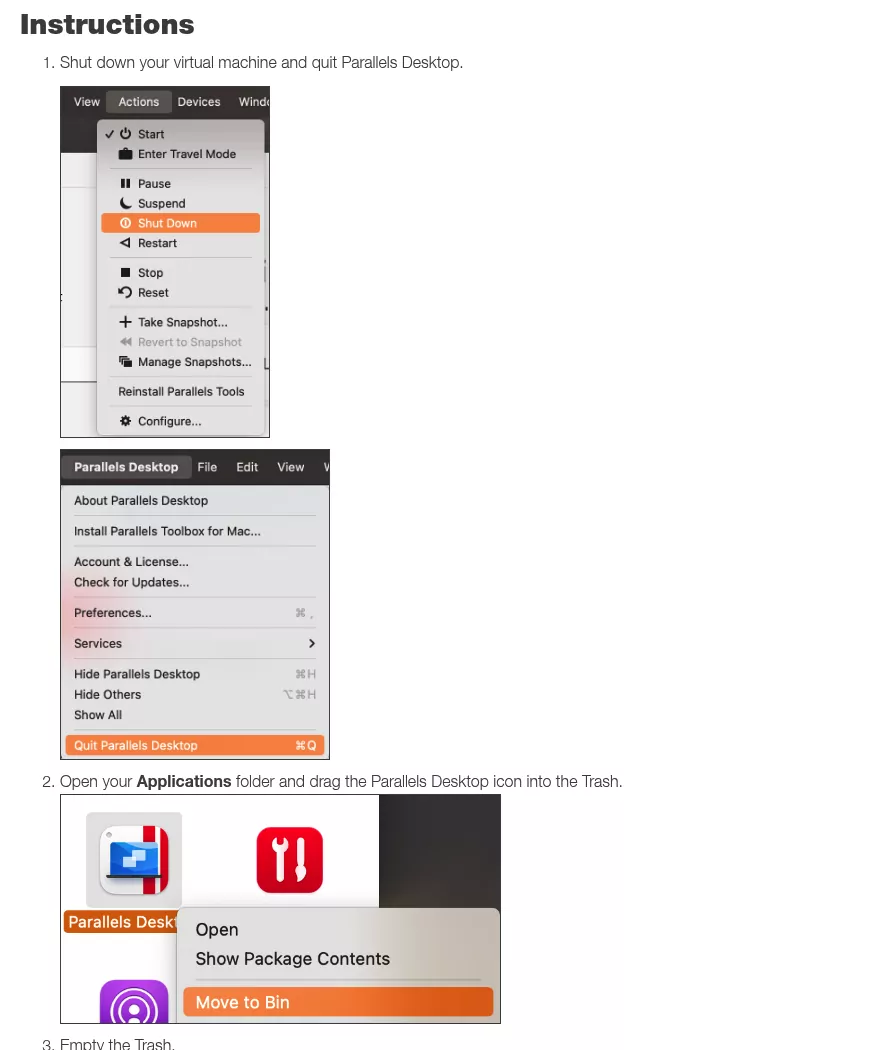
For the App Store Edition, KB 123802 says to right-click Parallels Desktop for Mac App Store Edition in Applications and choose Move to Trash. Parallels Toolbox and Parallels Client are separate apps, so check for them too.
Step 3: Delete Parallels preferences, caches and support files
Open Finder, choose Go, then Go to Folder, and type ~/Library. Two items are named in Parallels' own docs:
-
~/Library/Preferences/com.parallels.Parallels Desktop.plist. This is the app's settings file. -
~/Library/Parallels. It holds support data, such as the Dock menus for Windows apps.
Other items vary by version and edition, so list them rather than guess. This command only prints names:
find ~/Library -maxdepth 2 -iname '*parallels*' 2>/dev/nullDrag each result that clearly belongs to Parallels Desktop to the Trash. Keep items for Parallels Toolbox or Parallels Client if you still use them. The App Store Edition folder in Group Containers can hold virtual machines, so remove it only after Step 1.
Step 4: Remove system-wide files and background helpers
Warning: these files belong to every account on the Mac and need an admin password. Finish the licence step first.
Parallels' support articles put its network settings in /Library/Preferences/Parallels. They call its background service com.parallels.desktop.launchdaemon, as in KB 8089. To see which launch files exist, run this read-only list:
ls /Library/LaunchDaemons /Library/LaunchAgents ~/Library/LaunchAgents | grep -i parallelsUse Go to Folder to open each folder and drag only the files that start with com.parallels to the Trash, unless the file is clearly for Parallels Toolbox or Parallels Client and you still use it. Then list anything else Parallels left in the shared Library:
find /Library -maxdepth 2 -iname '*parallels*' 2>/dev/nullMove to the Trash only the results clearly named for Parallels Desktop, and keep Parallels Toolbox or Parallels Client items if you still use them. Never delete anything under /System. macOS protects that area, and nothing in this guide lives there.
Step 5: Check for system or kernel extensions
This step mostly matters on Intel Macs. Parallels' article on allowing its extensions on Intel Macs lists com.parallels.kext.hypervisor, plus three more that only load in version 20 or earlier. KB 125319 adds that machines set to the Apple hypervisor do not need Parallels kernel extensions.
Restart your Mac, then run these two read-only checks:
kmutil showloaded | grep -i parallels
systemextensionsctl list | grep -i parallels
No output means no Parallels kernel extension is loaded and no Parallels system extension is registered. If a line still appears after a restart, do not remove files by hand. Ask Parallels support instead, as macOS looks after these files.
Step 6: Clear Windows app shortcuts and file associations
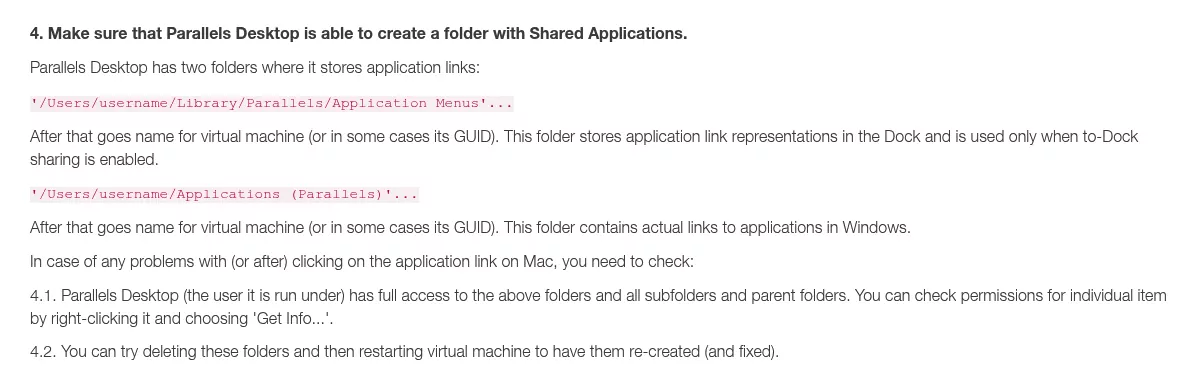
When Windows apps are shared with the Mac, Parallels keeps links to them in ~/Applications (Parallels), one folder per virtual machine, per KB 121008. Drag that folder to the Trash, and drag any Windows app icons out of the Dock.
This folder is also why Windows apps can turn up on a new Mac. A Time Machine restore or a migration can carry it across with your home folder. The icons then show in Launchpad, or the Apps window in Spotlight that replaces it on macOS Tahoe 26, until you remove the folder.
Some files may still open in a Windows app. Select one, choose File, then Get Info, open Open with, pick a Mac app and click Change All.
Step 7: Empty the Trash and compare your storage
Choose Finder, then Empty Trash. Space only comes back once the Trash is empty.
Then open Apple menu, System Settings, General, Storage, as Apple's guide to freeing up storage on Mac shows. On macOS Monterey and earlier, use About This Mac, then Storage. Free space should rise by roughly the sizes you noted.
If less space came back than you expected, stay in the same Storage window and click the More Info button next to a category to see what still uses space. If you are weighing a disk map app for this, the GrandPerspective alternatives and DaisyDisk alternatives roundups compare them.
Confirm nothing from Parallels Desktop is still running
Open Activity Monitor and search for Parallels, then for prl. Parallels' support pages name prl_disp_service as its background service and prl_vm_app as a running virtual machine.
A running virtual machine can also show as Parallels VM, as KB 116263 notes, or under its own name, such as Windows, as KB 112764 shows. Search for those names too. None of these should appear.
Next, choose Apple menu, System Settings, General, then Login Items & Extensions, as Apple's Login Items guide explains. Look for Parallels under App Background Activity on macOS Tahoe 26 and later, or Allow in the Background on macOS Sequoia 15.
Finally, check launchd. The first command shows jobs in your own session. The second is also read-only but needs your admin password, because only it sees system daemons like those in Step 4:
launchctl list | grep -i parallels
sudo launchctl list | grep -i parallels
Restart and run all three checks once more. Blank results mean Parallels Desktop is gone.
Reinstalling Parallels Desktop later
You never need to uninstall to upgrade, because the new version replaces the old one. If you kept a .pvm, put it back and double-click it to register and start it. App Store Edition users can reinstall from their App Store purchases.
Frequently Asked Questions
Does uninstalling Parallels Desktop delete my Windows virtual machine?
No. The .pvm stays on disk until you remove it, which is why Step 1 comes first.
Why do Parallels apps still show in Launchpad after uninstalling?
The shortcuts live in the Applications (Parallels) folder in your home folder, which a restore or migration can bring back. Step 6 covers it.
How do I uninstall Parallels Desktop on Mac after my trial ends?
You do not need the app to open. Find each .pvm with Finder or Spotlight, as KB 117333 shows, and drag it to the Trash once you have copied what you need. Then follow Steps 2 to 7.
Is it safe to delete the Parallels folder in my home folder?
Only after you check it. By default it holds your virtual machines, so copy anything you want to keep before it goes.
Removing other apps from this Mac
Other apps leave different traces. Removing Kaspersky on Mac involves system extensions, while removing Sublime Text on Mac includes a command line helper and a leftover line in your shell profile. Built-in apps have limits too, as the guide on uninstalling Safari on Mac explains.
Each guide covers one app: what it installs and where, what the vendor's method removes, and how to confirm nothing still runs. All of it uses Finder, System Settings and, now and then, Terminal.