How to Uninstall Ollama on Mac: Remove the App, the CLI and Gigabytes of Downloaded Models
To uninstall Ollama on Mac, start while it is still running: turn off Claude and ChatGPT in its Apps screen and sign out. Then quit Ollama from the menu bar and delete Ollama.app, the /usr/local/bin/ollama link, its folders in ~/Library and ~/.ollama (keep ~/.ollama/models if you want your models).
The app is small. The models are not: Ollama's docs say they "can be tens to hundreds of GB". As with removing Parallels Desktop, most of the space sits outside the app.
What Ollama installs on your Mac and where
Most items carry the app ID com.electron.ollama, left over from an older Electron build.
| Item | Path | What it holds |
|---|---|---|
| App | /Applications/Ollama.app |
The menu bar app, its server and the ollama command |
| Command link | /usr/local/bin/ollama |
A link to that command, made on first launch |
| Models and keys | ~/.ollama |
Models, logs, Terminal chat history and this Mac's sign-in key (id_ed25519) |
| App data | ~/Library/Application Support/Ollama |
db.sqlite: chats from the app's window, plus settings such as Model location |
| Caches and web data |
~/Library/Caches/com.electron.ollama, ~/Library/Caches/ollama and ~/Library/WebKit/com.electron.ollama
|
Files the app can rebuild |
| Window state | ~/Library/Saved Application State/com.electron.ollama.savedState |
Window size and place |
| Preferences |
~/Library/Preferences/com.electron.ollama.plist, if present |
Not on the vendor's list, but on Homebrew's |
| Login item | Inside the app (com.ollama.ollama) |
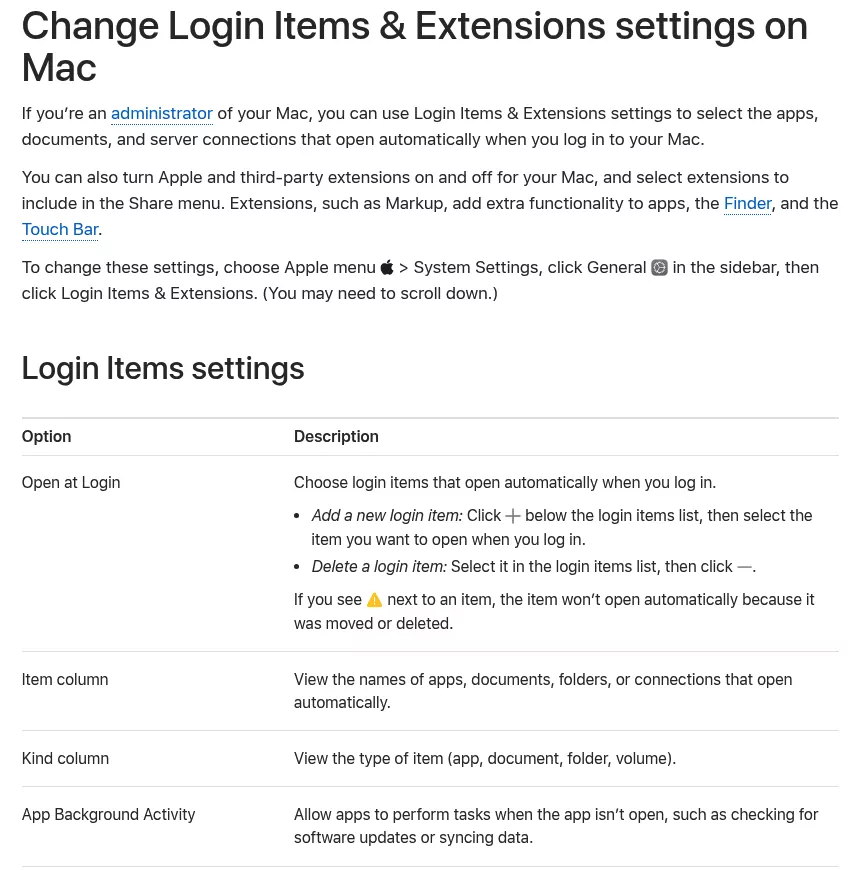
Starts the app at login; listed under Allow in the Background (App Background Activity on macOS Tahoe 26 and later) |
~/.ollama may also hold server.json, launch, backup and chatgpt-ollama (a ChatGPT profile that can hold a sign-in). Models in ~/.docker/models belong to Docker Model Runner, not Ollama.
Why dragging Ollama to the Trash is not enough
The Trash takes the app and nothing else. Your models stay, the command link points at nothing, and the app's chats stay in db.sqlite.
If you linked Claude or ChatGPT, Ollama pointed them at its local servers (port 11435 for Claude, 11434 for ChatGPT's Codex mode). Backups of their own settings sit in ~/.ollama/backup.
Before you uninstall: decide what happens to your models
See how much space your models use
With the app running, ollama ls lists each model and its size. du -sh ~/.ollama/models prints the total.
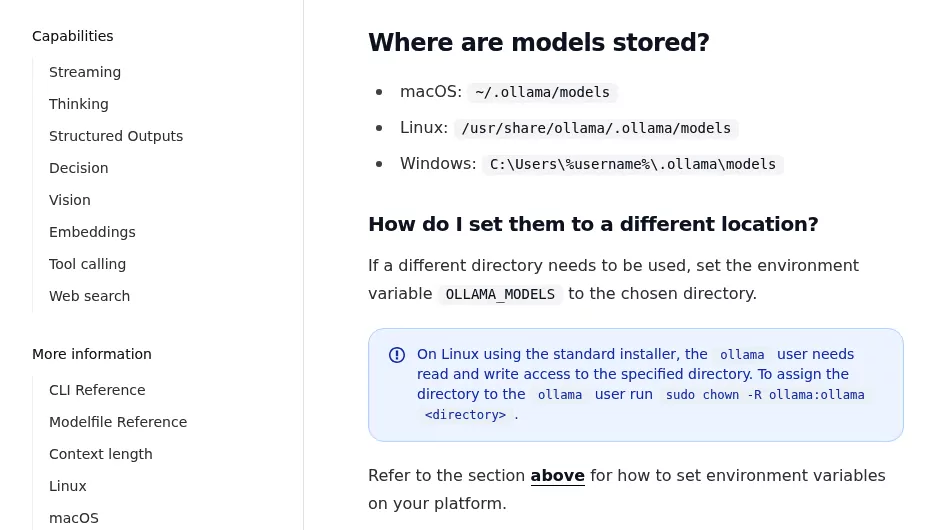
Models can live elsewhere. Check Model location in Settings, run launchctl getenv OLLAMA_MODELS and look in ~/.zshrc (the next section's check finds it).
Here are ways to see what else fills your disk.
Remove models with Ollama's own commands
To free space and keep the app, use its CLI commands. ollama ps lists the models now loaded, and ollama stop <model> unloads one. ollama rm <model> deletes one, by the name ollama ls shows.
Keep models for a later reinstall
Leave ~/.ollama/models in place, or copy it to another drive. A fresh install from ollama.com (macOS Sonoma 14 or later) finds the folder, so nothing downloads again.
Warning: deleting ~/.ollama removes all your models for good once the Trash is emptied. It also wipes this Mac's sign-in key and your Terminal chat history.
Disconnect Claude, ChatGPT and Codex first
Skip this if you never used the Apps screen or ollama launch. Otherwise, do it first: the undo needs the ollama command and ~/.ollama/backup.
With the app running, open Apps, disconnect Claude and turn ChatGPT off. The app puts their settings back, as its Claude and ChatGPT guides say. In Terminal:
ollama launch claude-desktop --restore
ollama launch chatgpt --restore
ollama launch codex --restore
Line one puts Claude back. Line two does the same for ChatGPT, which may ask to restart. Line three removes the Codex CLI profile Ollama added to ~/.codex, per its Codex guide.
These work even with the app quit.
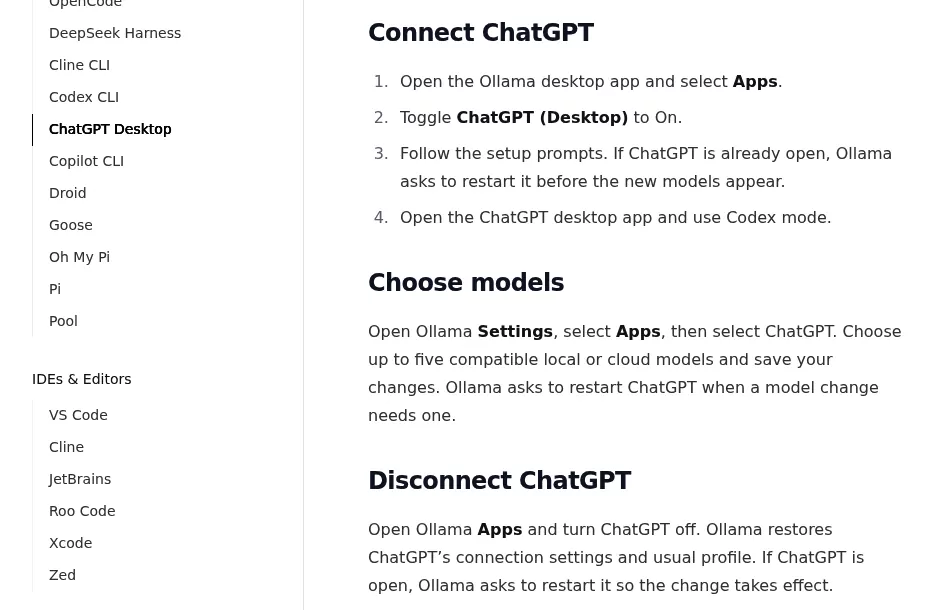
Quitting Ollama restores Claude, but not ChatGPT. While ChatGPT is on, Ollama edits ~/.codex/config.toml to route Codex mode through its server. The Codex CLI reads that file too. Delete the app first, and Codex mode and the codex command can point at a server that is gone.
Already deleted it? Reinstall Ollama, run ollama launch chatgpt --restore, then remove it again. If Ollama installed Claude or ChatGPT for you, they stay installed.
Claude Code and other tools
ollama launch claude changes only that session. If you set up Claude Code by hand, this read-only command finds the lines to remove:
grep -nE 'OLLAMA|ANTHROPIC_(BASE_URL|AUTH_TOKEN|API_KEY)' ~/.zshrc ~/.zprofile 2>/dev/nullIt prints each match with its file and line number. Open the file with open -e ~/.zshrc (or ~/.zprofile) and delete only Ollama's lines.
Those are ANTHROPIC_BASE_URL set to localhost:11434 or ollama.com, ANTHROPIC_AUTH_TOKEN set to ollama or your Ollama key, an empty ANTHROPIC_API_KEY and any OLLAMA_ line. Claude Code's own settings can override these, says Ollama's Claude Code guide. Clear any Ollama URL there too.
Used ollama launch with VS Code, OpenCode or Droid? Remove Ollama as a provider in its settings.
Sign out and deal with your ollama.com account
With the app still running, click Sign out in its Settings or run ollama signout. This unlinks this Mac's key from your account.
Already removed the app? Delete the key at ollama.com/settings/keys. Revoke any API keys there too, since they do not expire.
Trashing the app cancels nothing. Pro ($20 a month or $200 a year) and Max ($100 a month) live in your billing settings on ollama.com, per the pricing page. The privacy policy says you can delete the account under your profile there.
How to uninstall Ollama on Mac (app from ollama.com)
Ollama ships no uninstaller, just a file list on its macOS page. Apple's advice on removing Mac apps starts the same way: drag the app to the Trash.
- Click the llama icon in the menu bar and choose Quit Ollama. If you ran
ollama servein Terminal, press Control and C there. - Drag
/Applications/Ollama.appto the Trash. To find other copies, runmdfind "kMDItemCFBundleIdentifier == 'com.electron.ollama'". - Run
ls -l /usr/local/bin/ollama. If the link points into Ollama.app, remove it withsudo rm /usr/local/bin/ollamaand your password. Remove only that link, never the/usr/local/binfolder, which other tools use. - In Finder, choose Go > Go to Folder (press Shift, Command and G) and enter
~/.ollama. Drag the whole folder to the Trash, or, to keep your models, everything inside exceptmodels. - Do the same for each Library item in the table. Add
~/Library/HTTPStorages/com.electron.ollamaand~/Library/LaunchAgents/com.ollama.ollama.plistif you see them. - Empty the Trash to get the space back. Then, if you like, find your biggest files.
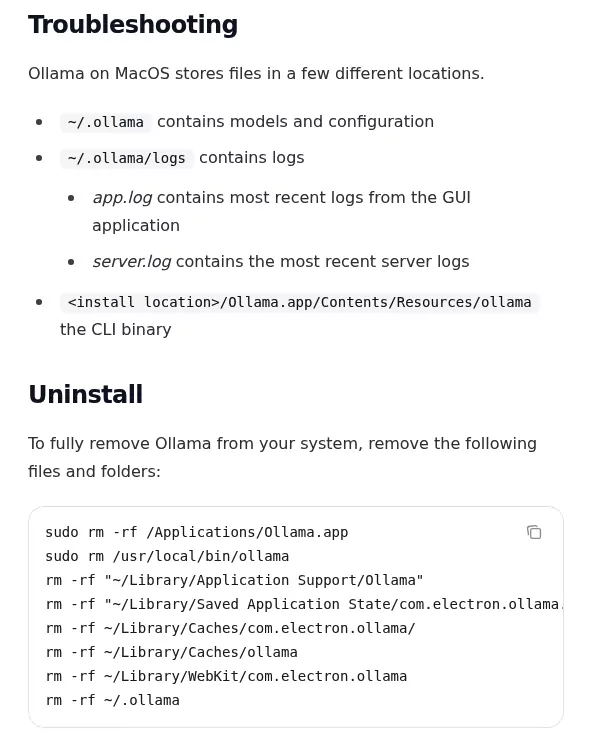
Prefer Terminal? Use $HOME, not a quoted ~
Two lines in that list put ~ inside quotes, such as "~/Library/Application Support/Ollama". The shell does not expand a quoted ~, so those lines delete nothing and show no error. This version uses $HOME instead.
Warning: rm -rf skips the Trash and cannot be undone. Line one below wipes the app's chats and settings.
rm -rf "$HOME/Library/Application Support/Ollama"
rm -rf "$HOME/Library/Saved Application State/com.electron.ollama.savedState"
rm -rf "$HOME/Library/Caches/com.electron.ollama" "$HOME/Library/Caches/ollama"
rm -rf "$HOME/Library/WebKit/com.electron.ollama"
rm -f "$HOME/Library/Preferences/com.electron.ollama.plist"
Line two clears its window state, and line three both caches. Line four takes its web data, and line five the preference file, if present.
For a full removal only, end with the line below. It wipes all models, your key and your history. To keep your models, use step 4 instead.
rm -rf "$HOME/.ollama"If you installed Ollama with Homebrew
Find your copy with these read-only commands. The first two print the formula or cask name, if any. The third shows which ollama runs.
brew list --formula | grep ollama
brew list --cask | grep ollama
which ollama-
Formula: run
brew services stop ollama, thenbrew uninstall --formula ollama. The flag avoids a clash with the cask's old name. -
Cask: run
brew uninstall --caskplus the name it printed:ollama-app, orollamaon older installs. Then do the link check from step 3 too.
Either way, ~/.ollama stays. The zap option trashes it too, models included: brew uninstall --zap --cask ollama-app.
Confirm nothing from Ollama is still running
In Activity Monitor (Applications > Utilities), search for ollama, Squirrel and llama-server. Quit any you find, as Apple's guide to quitting a process shows. Squirrel is a helper copy that starts the app at login, and llama-server runs models.
Then open System Settings > General > Login Items & Extensions (Login Items before macOS Sequoia 15). Ollama should be gone from Allow in the Background. On macOS Tahoe 26 and later, that list is App Background Activity, per Apple's Login Items guide.
Last, run four read-only Terminal checks:
pgrep -ilf ollama
launchctl list | grep -i ollama
lsof -nP -iTCP:11434-11435 -sTCP:LISTEN
which ollama
The first three list the app's processes, jobs such as com.ollama.ollama or homebrew.mxcl.ollama, and what listens on its ports. No output is good.
The last should print "ollama not found". If it prints a path, run hash -r and check again. A path that stays means a Homebrew copy or leftover link.
Used launchctl setenv? Run launchctl unsetenv OLLAMA_MODELS and launchctl unsetenv OLLAMA_HOST, then restart the Mac.
Frequently Asked Questions
How do I stop Ollama on my Mac without uninstalling it?
Choose Quit Ollama from the llama icon in the menu bar. For the Homebrew formula, run brew services stop ollama. To stop it starting at login, switch it off under Allow in the Background (App Background Activity on macOS Tahoe 26 and later).
Why can't I move Ollama to the Trash?
It is still running, so macOS says it is in use. Quit it from the menu bar first. Then quit any Ollama, Squirrel or llama-server left in Activity Monitor.
Why is Ollama still running after I deleted it?
A process is still in memory, the brew service is on, or an old launch agent remains. Run the checks above, quit what they show and restart.
Where are Ollama models stored on a Mac?
In ~/.ollama/models, unless Model location in Settings or OLLAMA_MODELS points elsewhere, as its FAQ explains.
Removing other apps from this Mac
Ollama is a small app with a lot of data, like Parallels Desktop and its VMs or Steam and its games. Sublime Text shares the other trap: its Terminal command can outlive the app.
Each guide here covers what the app installs, the vendor's route, the leftovers and a final check. Finder, System Settings and sometimes Terminal are all you need.