How to Uninstall Claude on Mac: Remove the Desktop App and the 10 GB Cowork VM It Leaves Behind
To uninstall Claude on Mac, quit Claude and drag Claude.app from Applications to the Trash. Then delete ~/Library/Application Support/Claude, often 10 GB or more because of the Cowork VM, plus Claude's caches, preferences, logs, Finder Quick Actions and Chrome helper file. Keep ~/.claude if you use Claude Code.
That is the short answer to how to uninstall Claude on Mac. Most of the space is one VM disk, much like the virtual machines Parallels Desktop leaves behind. Every path was checked on macOS Tahoe 26.6.2 with Claude 2.19675.0.
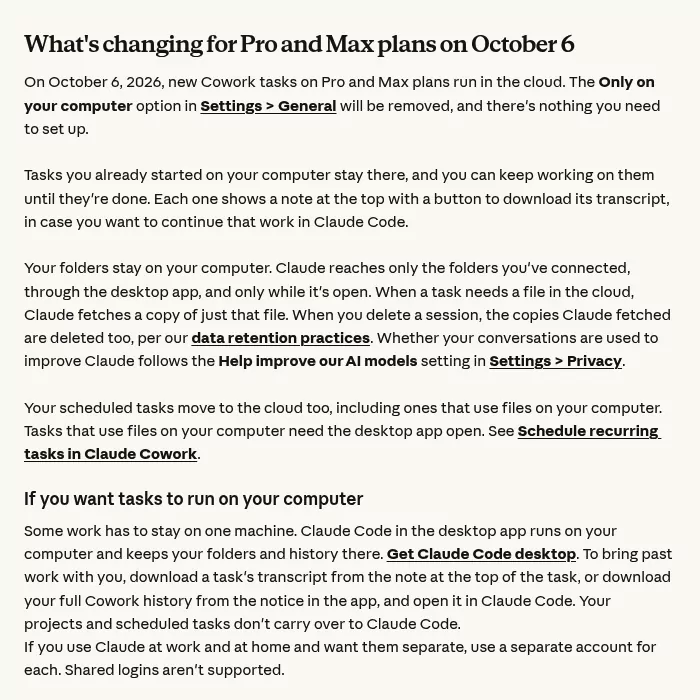
From October 6, 2026, new Cowork tasks on Pro and Max run in the cloud. Tasks that already ran on your Mac stay only there, so save them first.
| Which Claude do you have? | What to do |
|---|---|
| Claude.app, with Chat, Cowork and Code tabs | This guide shows how to uninstall Claude desktop. |
You type claude in Terminal |
That is Claude Code, a separate install with its own guide on this site. |
| Both | Remove the desktop app first, then Claude Code, then ~/.claude last. |
| claude.ai in a browser, or the phone app | Nothing to remove from the Mac. |
What Claude installs on your Mac, and where
Claude has no installer package. Apart from the app, ~/.claude and, if you have it, ~/Claude, everything sits in your user Library, plus one Keychain item. Sizes are from the test Mac.
| Path or item | What it is | Size |
|---|---|---|
/Applications/Claude.app |
The app, its helpers and its updater | 885 MB |
~/Library/Application Support/Claude |
App data, including the Cowork VM | 13 GB |
~/Library/Application Support/Claude-3p |
Third-party mode data (Bedrock, Vertex AI) | 4 KB |
~/Library/Logs/Claude |
Logs | 15 MB |
Items named com.anthropic.claudefordesktop in Caches, HTTPStorages and Preferences |
Caches, web storage, settings and the updater's files | 4 MB |
Three Claude workflows in ~/Library/Services
|
Finder Quick Actions: Ask Claude, Send to Claude, New Claude Code Session Here | Tiny |
com.anthropic.claude_browser_extension.json |
Links the Claude in Chrome extension to the app | Tiny |
| Keychain item "Claude Safe Storage" | The key that encrypts sign-in tokens | None |
~/.claude and ~/.claude.json
|
Code tab data, shared with Claude Code | 7.9 GB |
Inside the 13 GB folder:
-
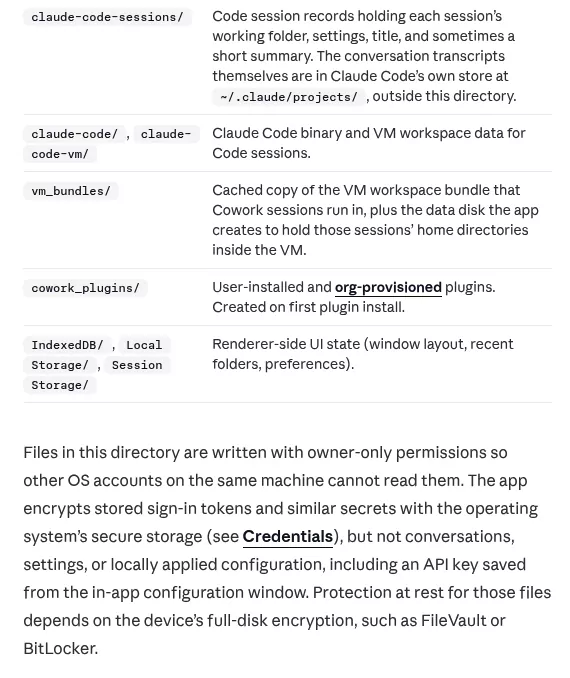
vm_bundles, about 10 GB: the Claude VM bundle.claudevm.bundleholds the Cowork Linux VM disk,rootfs.img, andsessiondata.img, the disk with each local Cowork session's home folder. -
Partitions, 1.4 GB: mostly the built-in preview browser. -
claude-codeandclaude-code-vm, 652 MB: the app's private Claude Code copies, not the CLI. -
Code CacheandCache, 614 MB. -
local-agent-mode-sessions: Cowork tasks that ran on this Mac. This is the only copy. -
claude_desktop_config.json,Claude ExtensionsandClaude Extensions Settings: your MCP servers and extensions.
Treat 10 GB as typical: user reports run from 10 to 21 GB. Advice naming "cloudvm.bundle" or a com.claude.Claude folder is wrong: neither exists.
Anthropic's local data page also lists ~/Claude for Artifacts. The test Mac had no such folder and no LaunchAgents or LaunchDaemons files.
Why dragging Claude to the Trash is not enough
The app is 885 MB. Its data is 13 GB, and none of it leaves with the app.
Trashing Claude.app also leaves the Quick Actions, login item, Chrome helper file, Keychain item and privacy permissions. The Quick Actions even linger in Finder's right-click menu.
Delete the data folder without a backup, and local Cowork history is gone for good.
Is there an official Claude uninstaller?
No. Claude has no Uninstall menu item, and Anthropic's Install Claude Desktop article has no removal steps. Ignore advice to run claude uninstall: it is not a documented command, and the CLI is a separate product.
The closest built-in tool is Help > Troubleshooting > Reset App Data…. It empties the app data folder, Cowork VM and local history included, but leaves the app, caches, preferences and Quick Actions.
If you installed Claude with Homebrew
The cask claude is the desktop app, and claude-code is the CLI. Two commands give very different results:
brew uninstall --cask claudeThis quits Claude and removes Claude.app. Nothing else.
brew uninstall --cask --zap claudeThe extra --zap also moves the app data folder, caches, logs and preferences file to the Trash.
Warning: --zap moves your local Cowork history and MCP setup to the Trash without asking. Back them up first, and do not empty the Trash until your backups are confirmed.
Even --zap misses Claude-3p, the Quick Actions, the helper file, the Keychain item, the login item and privacy permissions. Steps 1 and 3 to 7 below cover them.
If you only want the space back
There is no separate way to uninstall Claude Cowork, since it is part of the app. Instead, use Help > Troubleshooting > Delete Cowork VM Bundle and Restart…. It stops Cowork tasks, deletes vm_bundles/claudevm.bundle and restarts Claude.
The space may not stay free: Anthropic's dialog says the bundle "is downloaded again the next time you use Cowork".
Warning: deleting the bundle, by menu or by hand, also deletes sessiondata.img, the disk with each local Cowork session's home folder. Finish or download what you need from local tasks first.
Free Up Cowork Disk Space…, added in June 2026 per the Claude changelog, only clears Cowork caches and never touches the 10 GB disk. Avoid Delete Cowork VM Sessions and Restart… unless you want local history gone: it "can't be undone".
Per Anthropic's Cowork on web, desktop and mobile article, new Pro and Max tasks run in the cloud from October 6, 2026. So for Claude Cowork on Mac, the VM mostly serves older local tasks. On Team and Enterprise plans, local sessions remain an option, so ask your admin first.
Before you uninstall Claude desktop: save what exists only on this Mac
Chats, Projects and cloud Cowork tasks live in your Claude account. For a copy, use Settings > Privacy > Export data, per Anthropic's export guide.
Tasks you ran locally exist only on this Mac. Download each transcript from the note at the top of the task, or your full Cowork history from the notice in the app. Help > Troubleshooting > Show Cowork Session Data in Finder opens the raw files.
Copy these whole, without editing them, to a drive you keep:
-
local-agent-mode-sessionsandvm_bundles/claudevm.bundle/sessiondata.img -
claude_desktop_config.json,Claude ExtensionsandClaude Extensions Settings -
~/Claude(or~/Documents/Claudeon older installs) andClaude-3p, if you have them
The setup files can hold API keys for your MCP servers in plain text. Keep the copies private, and revoke keys you no longer need.
How to uninstall Claude on Mac, step by step
Use Finder's Go to Folder for every path: press Shift, Command and G, paste the path and press Return.
Step 1: Quit Claude and stop it opening at login
- In Claude, open Settings, click General and turn off Run on startup.
- Choose Claude > Quit Claude.
- Open Activity Monitor and search for Claude. If anything is still listed, select it and click Stop, as Apple's Activity Monitor guide shows. If you use Claude Code in Terminal, leave its lowercase claude process running.
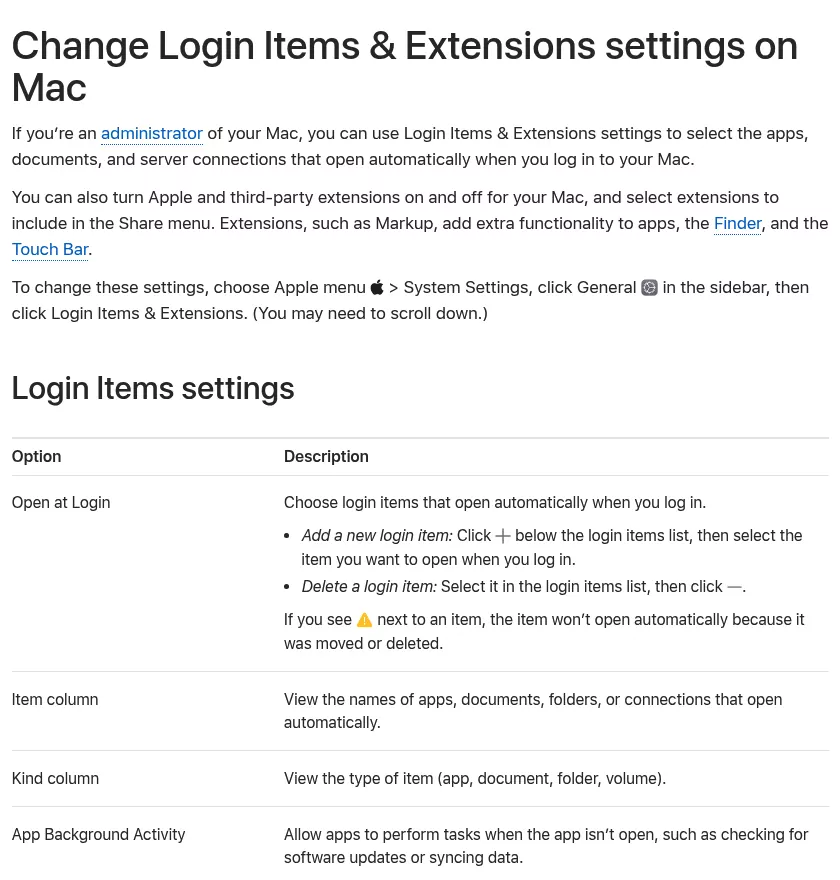
- Open System Settings > General > Login Items & Extensions. If Claude is under Open at Login, select it and click the minus button.
A running Cowork task adds com.apple.Virtualization.VirtualMachine. Docker Desktop and other VM apps use that name too, so do not force quit it blindly.
Step 2: Move Claude.app to the Trash
Open Finder, click Applications and drag Claude to the Trash. If Finder says Claude is in use, something from Step 1 is still running.
Step 3: Delete Claude's data folders
Warning: this erases local Cowork history, MCP setup and the Cowork VM. Make the backups above first.
- Go to
~/Library/Application Supportand trash theClaudefolder. Itsclaude-codesubfolder is not the Claude Code CLI, so a CLI install is untouched. - Trash
Claude-3pthere too, if present. If you used Bedrock or Vertex AI, it holds that mode's only chat history. - A
~/Claudefolder (or~/Documents/Claudeon older installs), if you have one, holds your Artifacts. Trash it once you have copied what you need.
Step 4: Clear caches, preferences and logs
Trash each of these. Skip any that are missing.
-
~/Library/Caches/com.anthropic.claudefordesktopandcom.anthropic.claudefordesktop.ShipItbeside it ~/Library/HTTPStorages/com.anthropic.claudefordesktop~/Library/Preferences/com.anthropic.claudefordesktop.plist- In
~/Library/Preferences/ByHost, the file startingcom.anthropic.claudefordesktop.ShipIt. Its name ends in your Mac's hardware ID. -
~/Library/Logs/Claude, and~/Library/Logs/Claude-3pif present
Step 5: Remove the Quick Actions and browser helper file
- In
~/Library/Services, trashClaude - ask.workflow,Claude - send.workflowandClaude - codeHere.workflow. Leave other workflows alone. - In
~/Library/Application Support/Google/Chrome/NativeMessagingHosts, trashcom.anthropic.claude_browser_extension.json. Check the matching Microsoft Edge folder too.
Keep com.anthropic.claude_code_browser_extension.json. Anthropic's Claude Code in Chrome page says that file belongs to Claude Code. If Chrome is going too, the Chrome removal guide covers its own folders.
Step 6: Clear the updater job, permissions and Keychain item
Claude's updater runs a background job with no file on disk, so a restart clears it. To clear it now, paste this into Terminal:
launchctl remove com.anthropic.claudefordesktop.ShipItIt removes that one job from your user session. It needs no sudo and touches no files.
Next, in System Settings > Privacy & Security, remove Claude from Accessibility and Screen & System Audio Recording. Anthropic's quick entry guide and desktop docs say quick entry and computer use need those. Then check Microphone, Speech Recognition, Automation, Files & Folders and Local Network.
Last, press Command and Space and open Keychain Access. Search for "Claude Safe Storage" and delete it. Leave "Claude Code-credentials" alone if you still use Claude Code.
Step 7: Remove ~/.claude only if you never installed Claude Code
The Code tab writes to ~/.claude, the folder the Claude Code CLI uses too. To check for the CLI, run this in Terminal:
command -v claudeIt prints a path if a claude command is installed, and nothing if not. If it prints a path, skip this step.
The Claude Code extensions for VS Code and JetBrains use ~/.claude too. They do not add a claude command, so skip this step if you use either one.
Warning: deleting~/.claudeerases your Code tab transcripts and settings. Copy~/.claude/projectssomewhere safe first.
Otherwise, go to ~, press Shift, Command and period to show hidden items, and trash .claude, .claude.json and .claude.json.backup. Then trash ~/Library/Caches/claude-cli-nodejs.
Step 8: Empty the Trash
Once your backups are confirmed, choose Finder > Empty Trash. Apple's guide to uninstalling apps notes that this removes an app for good.
What to keep if you still use Claude Code
Removing the desktop app leaves Claude Code working, in Terminal, VS Code or JetBrains. Keep ~/.claude, ~/.claude.json, ~/Library/Caches/claude-cli-nodejs, the "Claude Code-credentials" Keychain item, Claude Code's own Chrome helper file and any .claude/worktrees folders in your projects.
To remove the CLI too, Anthropic's Claude Code setup page lists the commands.
Your account, subscription and cloud data
| Data | Where it lives |
|---|---|
| Chats and Projects | Your Claude account |
| Cloud Cowork tasks | Your Claude account (a deleted task leaves Anthropic's backend within 30 days) |
| Local Cowork tasks | This Mac only |
| Code tab transcripts |
~/.claude/projects on this Mac |
| Third-party mode history |
Claude-3p on this Mac |
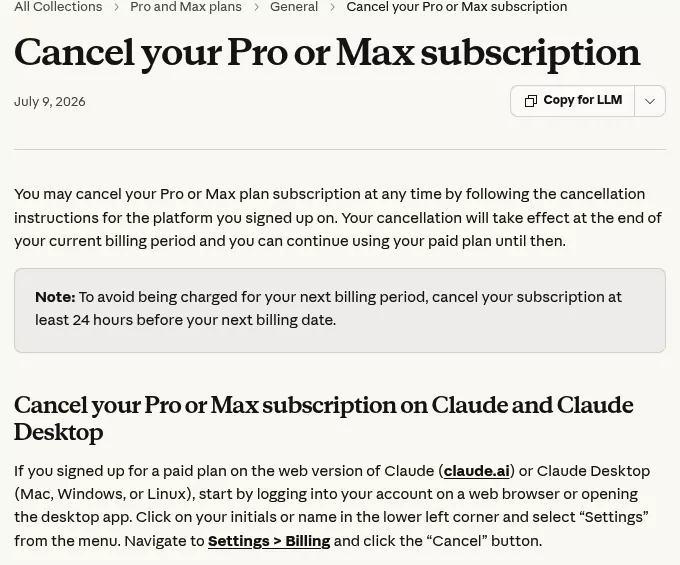
- Subscription: uninstalling does not cancel Pro or Max. Cancel in Settings > Billing at least 24 hours before renewal, or through Apple or Google Play for phone subscriptions, per Anthropic's cancellation guide. The Microsoft Office guide shows the same split.
- Sign-in: sign out before you uninstall, or later end the Mac's session in Settings > Account > Active sessions on claude.ai, as the active sessions guide shows, or log out of all devices.
- Connectors: disconnect the ones you no longer use in Customize > Connectors, per the connectors guide.
- Account: deleting it is a separate step. Cancel and export first, as Anthropic's account deletion guide advises.
Confirm nothing from Claude is still running
Restart your Mac, then check each place:
- Activity Monitor: search for Claude. Nothing should appear, apart from a lowercase claude process if Claude Code is running in Terminal.
- Login Items & Extensions: no Claude under Open at Login or App Background Activity, as Apple's Login Items guide shows.
- Privacy & Security: no Claude in the lists from Step 6.
- Finder: right-click a file and open Quick Actions. No Claude items should show.
- Keychain Access: no "Claude Safe Storage".
Then run this read-only check in Terminal:
launchctl list | grep -i anthropicIt lists your background jobs with "anthropic" in the name. No output means none are left.
Finally, System Settings > General > Storage shows the space coming back, as Apple's storage guide explains. To spot other big folders, try the Finder method for finding large folders.
Reinstalling Claude cleanly
For a clean start, do Steps 1 to 4 first. Then download Claude from claude.ai and drag it to Applications. It needs macOS 13 Ventura or later.
To restore your MCP servers, quit Claude and copy your saved claude_desktop_config.json into ~/Library/Application Support/Claude. If you run Cowork tasks locally, the VM downloads again.
Frequently Asked Questions
Does uninstalling Claude delete my chats and projects?
No. Chats, Projects and cloud Cowork tasks live in your Claude account. Only local Cowork tasks and Code tab transcripts stay on the Mac.
What is the Claude VM bundle, and why is it 10 GB?
It is the Linux VM that runs Cowork tasks locally, in vm_bundles/claudevm.bundle. Most of its size is one disk image, rootfs.img.
Can I delete the Cowork VM but keep Claude?
Yes, with Help > Troubleshooting > Delete Cowork VM Bundle and Restart…. Save local tasks first, since it deletes their data too.
How do I delete Claude's cache on Mac without uninstalling?
Help > Troubleshooting > Clear Cache and Restart clears the app's web caches. Free Up Cowork Disk Space… clears Cowork caches. Reset App Data… is the full reset.
How do I stop Claude opening at startup without uninstalling?
Turn off Run on startup in Claude's Settings > General.
Removing other apps from this Mac
For another app with a big VM, see Parallels Desktop. Grammarly is another AI assistant with a desktop app and a browser extension. For a developer tool with a command-line helper, see the Sublime Text guide.